Malware Analysis: First Steps

We’re working at our PC when an alert pops up: a highly suspicious executable with an unusual name.
We decide to investigate.
At this stage, we don’t know whether it’s legitimate software or not. The name is unfamiliar, and a colleague mentions having installed some utilities a few days ago, it could be part of a required package.
So here we are: we’re analysts, and we need to make a call.Is this a real threat? Is it worth investing time in? Or is it just a false positive?
In short, we need to decide how much time this potential threat deserves.

Isolation
Study the sample in an isolated environment.
We still don’t know what we’re dealing with running it directly could compromise your system. Always use an isolated setup for testing, one that you can easily reset if something goes wrong.
The ideal setup is:
A Linux or macOS host
A Windows virtual machine on top
This way, if you’re analyzing Windows malware, you reduce the risk of it escaping and infecting the host system.
Using a VM also allows you to maintain a clean baseline snapshot that you can restore before each test.
Setting up a proper malware analysis lab is not trivial and deserves its own dedicated guide. Here, we’ll just cover the basics.
Threat Intelligence
Don’t reinvent the wheel.
What you’re seeing might already be known, so start by checking existing intelligence sources.
Take the executable and analyze it with a tool I always recommend: PEStudio.It provides a wealth of useful information let’s focus on a few key points.
First, extract the SHA256 hash and copy it.
Then move on to the strings embedded in the executable.

We may notice:
HTTP-related parameters
A user-agent string suggesting network communication capabilities
A registry path like \Run, commonly used for persistence (i.e., surviving system reboots)
These capabilities are also confirmed by the imported functions used by the binary.


Hash Lookup & Intelligence Platforms
A hash acts as a unique fingerprint of a file, different executables produce different hashes.
Now let’s search this hash on platforms that collect malware samples. The most powerful ones include:
VirusTotal
MalwareBazaar
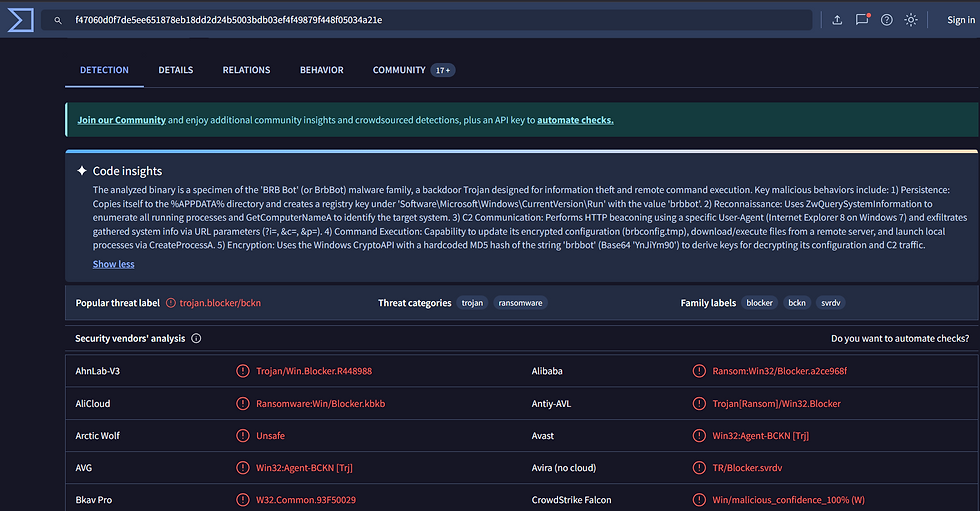
The results often provide valuable insights. The detection score alone shouldn’t be overemphasized, but platforms like VirusTotal now include features like Code Insight, which leverage LLMs to summarize known information about the sample.
In our case, the malware appears to be known under multiple names, commonly referred to as brbbot.
Indicators of Compromise (IoCs)
Let’s focus on key artifacts such as:
The persistence registry key
The user-agent string
URL parameters used by the malware
These are all Indicators of Compromise (IoCs) that can be used to detect infections on other machines.
Sandbox Analysis
We can perform a similar analysis using sandboxing platforms like ANY.RUN.
These platforms allow for easy dynamic analysis, just drag and drop the sample. The system executes it and tracks its behavior in real time.
Again, the results are quite concerning.

Conclusion
With a relatively quick analysis, we’ve established that:
The sample is likely a trojan
We have actionable IoCs to hunt for across the environment
There’s certainly more to investigate, but we already have enough information to share with colleagues responsible for system inspection.
Meanwhile, we can take the time to perform a deeper analysis of the malware.



Commenti